|
If you are looking for Google QR API
information use this link
If you are looking for QR posts on my
blog use this link
If you are looking for the Telstra
www.QRious.com.au QR campaign pdf use this link
60 Second QR-codes For those of you who STILL think 2D codes are a geeky toy – I’ve been using a new “description” when developing marketing campaigns for clients lately;
So every movie poster, every advertisement shown on tv, every
compact disc label in a retail store should have a qr code on
it.”
So What Are QR Codes?
QR codes are the
commercial name for a type of 2D(dimensional) bar code. The 3 “big boxes” in the corners simply tell the camera which way the code is orientated, so QR codes can be snapped in any direction but generally are printed with the 2 big boxes in the top and one on the left. 
Where Did QR Codes Come From? QR codes were originally invented in Japan by Denso for industrial bar codes on packaging for warehousing and production purposes In their wisdom they realized that this “standard” would be more beneficial if everyone could use it, so they open sourced the technology and now anyone can create, read and implement QR code technology for free with no license fees being required. There have been several other 2D code technologies available over the years but all required some form of license fees as such they haven’t been widely accepted and adoption results have been disappointing.
How Did QR Codes End Up On My Phone? In the 90’s the use of QR codes were rapidly changed by all of the Japanese mobile carriers sitting down and agreeing to implement QR software into their mobile phones. Originally it was just a concept for delivering business card information. For example the QR code below has a VCF card with my name, phone number, company name and email address. This is a highly efficient way to ‘store’ this information and by printing this 2-d image on the back of your business card allowed for very rapid deployment of information transfer into your electronic address book both on the phone and your desktop.
A few years ago USA
mobile carriers tried to 'milk money'
out of their customers with 'proprietary bar code' systems so
they can charge clients for reading codes and publishers for
printing codes.
It's a shame
considering the inventors of QR codes, Denso, were so visionary to
let anyone use their codes for free that people are now trying to
stand on their shoulders and rip people off. QR codes can be created
by anyone license free and most readers can be downloaded to any
camera enabled smart phone for free.
QR codes can be
read by almost any phone with a camera. Remember any QR code can be read by any reader. There are some variations on functionality but this is outside the scope of this overview. QR Codes can be implemented to do the following;
e.g. Message:
Dean@Cognation.net
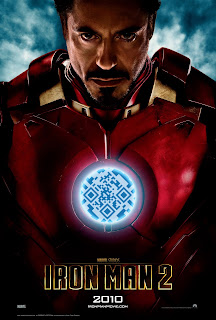
e.g. “Iron Man 2” QR movie poster campaign which had a QR code to access the movie's mobile site including trailers and interviews to be directly played on your mobile handset while in the cinema foyer.
So What QR Reader should I use? QR readers are pretty much the same. Every mobile phone smart OS has more than a few software developers offering different applications. Be sure to try a few until you find one you like. Unfortunately personally I feel ALL QR READERS are beta level at best. There are none (at least that i've seen) that do anything smart. When will we see a QR code reader that;
Basically as i see it QR code readers (and therefore their developers) are in the dark ages (lol feel free to hire me for further product application design). What are some real world uses of QR codes?
There are almost no
end to the number of real world uses for QR codes. -
What are some great QR campaigns? The key to a QR campaign is GIVE PEOPLE A REASON TO CLICK!!! If you fail at this basic step there is nothing that technology can do to help you but here are some great examples.
1/
Zoo Records "Hidden Sound" QR codes campaign
2/
JC Penny "Give a Little Magic"
IF ever there was a cool use for QR codes (not just practical),
this might just be it. JCPenney’s new “Who’s Your Santa” campaign
has a QR code extension for 2011, where everyone who buys a gift for
Xmas will receive a unique QR code Gift Tag or “Santa Tag” as they
are calling them…
http://www.digitalbuzzblog.com/jcpenney-voice-message-qr-code-santa-gift-tags
3/
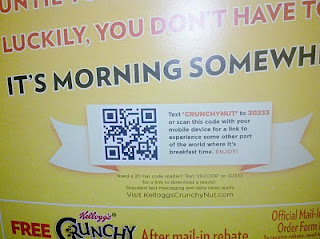
Kellogs "Crunchy
Nut" random morning videos Running a campaign, which is titled "It's Morning Somewhere"
the idea behind the campaign is that Kellogg's has placed a QR Code
on the back of Crunchy Nut cereal boxes. The cool part is by randomizing what you land on there is something different for you to view from around the world every morning (no i dont know how many videos they did).
So What QR publisher/analytics platform should i use? So if you read this far you obviously think QR codes have potential. And if you are a business/content provider/developer you are thinking how can i use QR codes to add value to my offerings. Like anything you can do a simple code generation but eventually you are going to need to "manage" and "track" large numbers of QR codes you have publish. There are a whole class of software applications out there to help you do this - The problem is a lot of these companies are "doing it wrong". This isn't a bad
thing but you just need to understand the issue of "Direct" and
"Indirect" QR codes
and what it means moving forward. For example I was sent the BeQRious announcement announcement about their new QR management platform. As you can see from the screenshot above if you use one of their codes that the platform generates it doesn't actually lead to your website but leads to their website which they then redirect to your site. - Yeh ok but if they turn off the servers everything stops working. It's these shortcuts that people dont understand the ramifications that are going to give QR code management platforms a bad name. Instead you should ALWAYS have a web url QR code go to YOUR servers and then get redirected by your DNS eg www.Cognation.net/QR/123 that then redirects to the mobilised content you want to serve up for that particular campaign. NEVER rely on someone else to be "in the middle", if you do and they go out of business or decided to jack up the rates all of your deployed codes will stop working (for the same reason i hate MsTags). As i said before
this isn't a bad thing but you just need to understand the issue of
"Direct QR codes" versus "Indirect QR codes" that use URL Redirection and what it means moving forward.
As long as you understand the pro's and cons you can move forward
fully educated. If you dont understand the issues, hire me, i'll make sure you step around the pitfalls of QR implementation.
How do I find out more? Feel free to contact Cognation for a briefing call to understand how
you and your marketing campaigns might be able to benefit from QR
codes. I can help with the most simplest question through to a more
complex long term engagement. Regards, Dean Collins
|
|